Developer documentation ‹ 9. The build chain and cloonix-patchelf › 11. Conventions and pitfalls
10. cloonix-gui-server and the canvas
Source: cloonsrc/jscloonix, a cmd. About 5000 lines of C and eleven javascript files. The C is one translation unit: cloonix_gui_server.c includes the web/*.c files directly, so the order of the includes at the bottom of that file matters.
10.1. It binds no tcp port
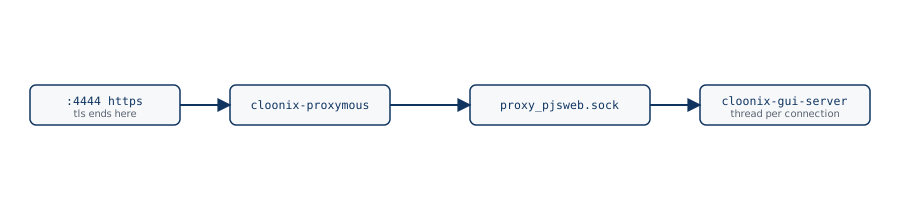
http_server_init listens on one unix socket:
<proxyshare>/proxy_pjsweb.sock the https port, decrypted by proxymous
The password is asked on it; the server sees plain http and never a tcp port.
10.2. One thread per connection
http_server_thread polls both listeners and starts a pthread per connection; a websocket carrying a shell lives for hours. Per-connection state lives in __thread variables, web_ctl_play.c among them.
These threads never send on doorways. A request of the canvas that goes to the main server is queued by job_post() in topo_web.c and sent by the main loop, woken by a pipe (job_rx()): the hmac key and digest, the rpc buffers and the tx queues of doorways belong to that one thread.
10.3. The routes
web_http.c is the dispatcher. Before any routing, at the top of handle_conn:
auth_ok          web_auth.c, basic, the net name and cloonix_passwd, on the secure socket only
origin_is_ours   Origin against Host
Then:
static files
/ctl/<verb>      topo commands start stop add-vm add-cnt add-lan add-tap
                 add-nat add-a2b add-c2c add-phy add-edge del-edge del-node
                 rma position poseth note cnf-a2b snf reboot-vm save-vm
                 wireshark-start vnc-desktop
/topo            the topology websocket
/play            the demo player
/sh-<net>/ssh/<vm>/ws   a shell
the vnc prefix   a desktop
Every browser word that becomes part of a path passes web_name_ok.
A browser on /topo gets, in this order, the topology, the layout, the state of every machine, the pending lans. The layout is the x= y=, angle= and note= the main server replayed to this gui server when it subscribed and pushed since; topo_web.c keeps it in a table because the main server replays its store once, to the gui server, while a browser holds nothing across a reload. A topology with no object empties the table, as del all empties the store.
Whether an air is captured travels in the topology, as the capture of an eth does: every radio carries, beside its air in vwif_air, the endp_type of that air in vwif_endp_type, endp_type_eths when cnf <air> sniff=on holds and endp_type_ethv otherwise, filled by cfg_store.c when the topology is made; wifi_air_snf sends a new topology on each change. topo_to_json gives the browser each air once, "air":[{"name","etype"}] with eths or ethv as for an eth, and the canvas draws a captured air in the colours of a sniffable eth (g_air_snf).
A note travels as item_note {name, txt}: layout_set_note in layout_store.c keeps it and sends it to every topology subscriber, layout_replay sends it again to a new one, and layout_forget_absent sends an empty one when it drops an item that had a note, so a browser does not keep the note of a deleted item. recv_item_note refuses a note that layout_note_cmd cannot write in a dump commands line of MAX_LIST_COMMANDS_LEN, which keeps every note replayable. The browser gets {"type":"itemnote"}; POST /ctl/note (the Note... of a menu) goes the other way through a job, the switch checking it as it checks the client. json_get_str decodes uXXXX into utf-8, python's json.dumps writing every non ascii character that way.
10.4. The page
Plain javascript, no framework, no build step, the files listed in cloonix.html:
cr-topo-core.js  cr-topo-draw.js  cr-topo-menu.js  cr-notes.js
cr-topo-panels.js  cr-play.js  cr-pcaprec.js  cr-rma.js  cr-a2b.js
cr-traffic.js  cr-tune.js
cr-notes.js holds what the canvas shows of the comments: the notes (g_notes), drawn whole under their item, and the outline of the items of a step (canvasHighlight, the names sectionCmd takes from the words of each command before any quote, a timer redrawing while it pulses).
A panel under the canvas is resized through it: its border zones carry data-rdir. panelBorderAtScreen answers nothing where an item of the topology is drawn (nodeAt, lanAt, ethAt), which then covers the border; elsewhere it takes the element just under the canvas in document.elementsFromPoint; when that is a border zone, that border shows at that point and nothing covers it, so the canvas sets the resize cursor on a move and calls _take then _resize on a press.
Every websocket url is built from location.protocol and location.host, so wss:// follows https://. noVNC checks window.isSecureContext and uses window.crypto.subtle, which a browser grants to https from any address, and to plain http on 127.0.0.1 alone: the one port being https, the check passes everywhere. The build stamp of the scripts is written by jscloonix/cmd into the header; make in jscloonix/jscloonix builds the server only, the scripts reach an installation through pack_cloonfs and install_cloonfs.
10.5. Playing a demo
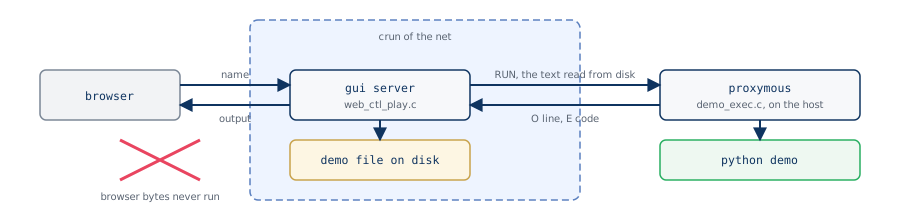
web_ctl_play.c: the browser sends the name in two header lines; play_script checks the first line of the file is a shebang and hands the text, read from the server's disk, to proxymous over proxymous_demo.sock. Then it polls both ends: every O <line> of the job goes to the panel, and every text frame of the panel, one per key, goes to the job as K <text>, which demo_exec.c writes on the demo's stdin with a newline; the job runs the demo with CLOONIX_DEMO_KEY=1 so its pause() knows a key can come, and with CLOONIX_DEMO_STORY=1 so its story() writes the history, each line marked #story#. The C side relays the marked lines like any other; the sorting is in cr-play.js, playLine, one call per websocket frame:
"#story# text"      event story   the history, never written in the log
"cloonix ..", "tar .."  event cmd written in the log, folded under the step
"[DONE ok= ko=]"    event end     the verdict of web_ctl_play.c
"[KO ...]"          event note    red
">>> ...", blank    log only
anything else       event note    the demo on stderr (2>&1 in demo_exec.c)
                                  or pause(): amber, red on an error word
The Comments panel is a panel of makePanelShell registered in g_demo_panels under
<key>_history, so raise, lower and Delete all treat it as any panel.
Every event is pushed on hist.events and drawn by historyDraw; closing
the panel drops the DOM only, and historyOpen (the Comments on button)
rebuilds it by replaying the list, historyFill. all.py marks each demo
it plays with the story lines #demo# n/N <path> <line> and #demoend#
<path> <exit code>: the first empties the list and starts the panel on
that demo, historyTitle puts the demo and its current step in the title,
the second draws the End of demo line, which stays the five seconds all.py
waits with CLOONIX_DEMO_FAST=0, none by default. The first also plays the clip of that demo; all.py, marked
PLAYS_THE_PACKAGES, has no line in demos/voice and no clip. The second
carries the exit code: 0 the end, 3 a demo that cannot run here, anything
else a failure; all.py stops after a 3 as after a failure. A failure, of a demo of all.py
or of a demo played alone, plays audio/demo_failed.ogg, a clip of the
panel made by PANEL of debug/demo_voice.py, then voiceFailure gives
the first line of the reason to the speech synthesis of the browser when
it has an english voice. The button reads
Comments off while the panel is open; hist.userOff, set by that button
or the close of the panel, keeps the next Play from opening it. Save
writes the events as markdown (historyMarkdown). A sniff line becomes a
capture whose display filter sniffToDisplay translates from the tcpdump
subset of pcap_filter.c (portrange is left out, the capture then opens
unfiltered); the panel posts it to the webshark page once that one says
connected, and the page applies it as if typed. A story line matching
[ 12.3s] text (the step() of the demos) or N. text opens a section,
sectionNew, with its chip; the section before it turns green, the last one
turns red on a failed end. parseAbout takes the docstring out of the text
of the demo, which the panel has fetched with /files/get before playing,
for the About view: nothing is asked of the server for it. historyEnd is
called on [DONE and again on the close of the websocket, where it does
nothing if a verdict came, and says failed if none did.
The container of the toy has no python, and no route accepts a programme.
Developer documentation ‹ 9. The build chain and cloonix-patchelf › 11. Conventions and pitfalls